Stoka
The core Stoka platform: inventory and point of sale for any kind of shop, with every business kept on its own separate account.
Get StartedBusiness management, simplified
Stoka puts inventory, point of sale and staff access in one system. The online edition updates stock on every phone, tablet and computer in your shop as sales happen. The Windows edition works with no internet connection at all.
Every feature for 7 days. No card needed. Nothing to install: it opens in your browser.
This sale
Cash · Receipt 0042
Stock goes down on every device.
Try it: tap the items, then Charge. Sample data, nothing is saved.
Who it is for
If you buy, store and sell goods, Stoka fits. These are the kinds of shop its features were built around.
Many small items, quick sales and a clear count of what is left on the shelf.
Farm Joy, the farm and agro-produce edition, runs on the same platform.
See stock and sales for each location and for the whole business, and move stock between them.
Keep a retail price and a wholesale price on the same item and sell at either.
Track what customers owe you and what you owe suppliers, on the books and not in memory.
The Windows edition sells with no internet connection at all.
How it works
Enter your business name, your email and a password. Your shop gets its own account with a 7-day free trial and no card.
Type in your products with their prices and counts, and give each staff member their own PIN.
Ring up a sale, print the receipt or save it as a PDF, and see the count change on every signed-in device.

Stoka AI
Stoka AI sits inside the app, one tap away on every screen. Ask in your own words and it answers with the steps, with every button named exactly as it appears on your screen. When the Admin allows it, it also reads your sales person by person.
Ask in English, Pidgin, Yoruba, Hausa or Igbo. The four local languages are still in beta, so the English steps are always shown too.
When you are online, your question can also be sent to an AI service to be written up in plain words. What goes out is the question, your last two questions and answers, the screen name, your language and a random installation code. Never your stock, your customers or your staff names, and Stoka does not keep the questions.
Stoka AIHelp and guideSampleHow do I sell on credit?
At checkout choose “Credit”, link the customer, and enter what they paid now.
Checkout.
Creditas the payment method.
Add new customer.
Amount paidfor what they paid now. Leave it at zero if they paid nothing.
Complete sale.
Receivables, open the customer and tap
Record Payment.
From the built-in guide.
| Person | Sales | Total | Refunds |
|---|---|---|---|
| Ada | 12 | ₦184,500 | ₦0 |
| Ngozi | 10 | ₦142,800 | ₦3,500 |
| Tunde | 8 | ₦96,200 | ₦11,000 |
No access,
Own sales onlyor
Everyone’s sales.
A sample with made-up names and numbers. Tap Sales to see it.
What's inside
On the online edition, stock counts update across every till, tablet and phone in your shop as sales happen, with no refresh needed.
A clean till with retail and wholesale pricing built in.
Every staff member gets their own PIN, and a sale can be put on hold and recalled later without losing the cart.
Switch between locations, see stock and sales for each one, and roll it all up to the whole business.
Transfer stock from one location to another with a clear record of what moved, and when.
Order from suppliers, receive against what actually arrived, and keep track of what you still owe.
Let trusted customers buy now and pay later, with every balance tracked on the books, not memory.
Bordered, proper-looking invoices, receipts and waybills. The Windows edition prints them on the printer your computer uses.
Stock valuation, an expiry watch on ageing stock, and a day-closing report for cashing up the till.
Export your stock, your sales, what you owe and what you are owed as CSV files that open in Excel.
Run it in the browser with nothing to install, or use the Windows edition in a shop that needs to work without internet.
Receipts
Every sale can end with a printed receipt. Each phone or computer keeps its own paper size, so the till at the counter can print a roll while the office prints A4.
Receipt printers differ, so print one test receipt on yours during the free trial. The Windows edition prints on the printer your computer uses.
SAMPLE STORE
Receipt 0042
1 x Rice, 50 kg bag78,000
2 x Vegetable oil, 5 L29,000
3 x Sugar, 1 kg6,900
TOTAL₦113,900
Cash120,000
Change6,100
THANK YOU
Sample receipt on an 80 mm roll
Safe sign-in
Each phone or computer signs in once with the owner's email and password. Someone who only knows your shop's web address is refused.
If the recovery key is lost too, message us on WhatsApp and we will help you get back in.
Small slips add up
An item sold but never written down, a miscount on the shelf, credit nobody chased. Move the two sliders to see the arithmetic for your own shop. It is a calculation, not a promise: Stoka cannot tell how much your shop loses, it only helps you see every sale and every count.
Worked out on six trading days a week. Change the sliders to match your shop.
See every sale for 7 days, freeOn stokabiz.com
The core Stoka platform: inventory and point of sale for any kind of shop, with every business kept on its own separate account.
Get StartedThe same platform in a farm and agro-produce edition, built for Farm Joy and available to other farm and agro businesses.
Get StartedNew from Stoka · Printed
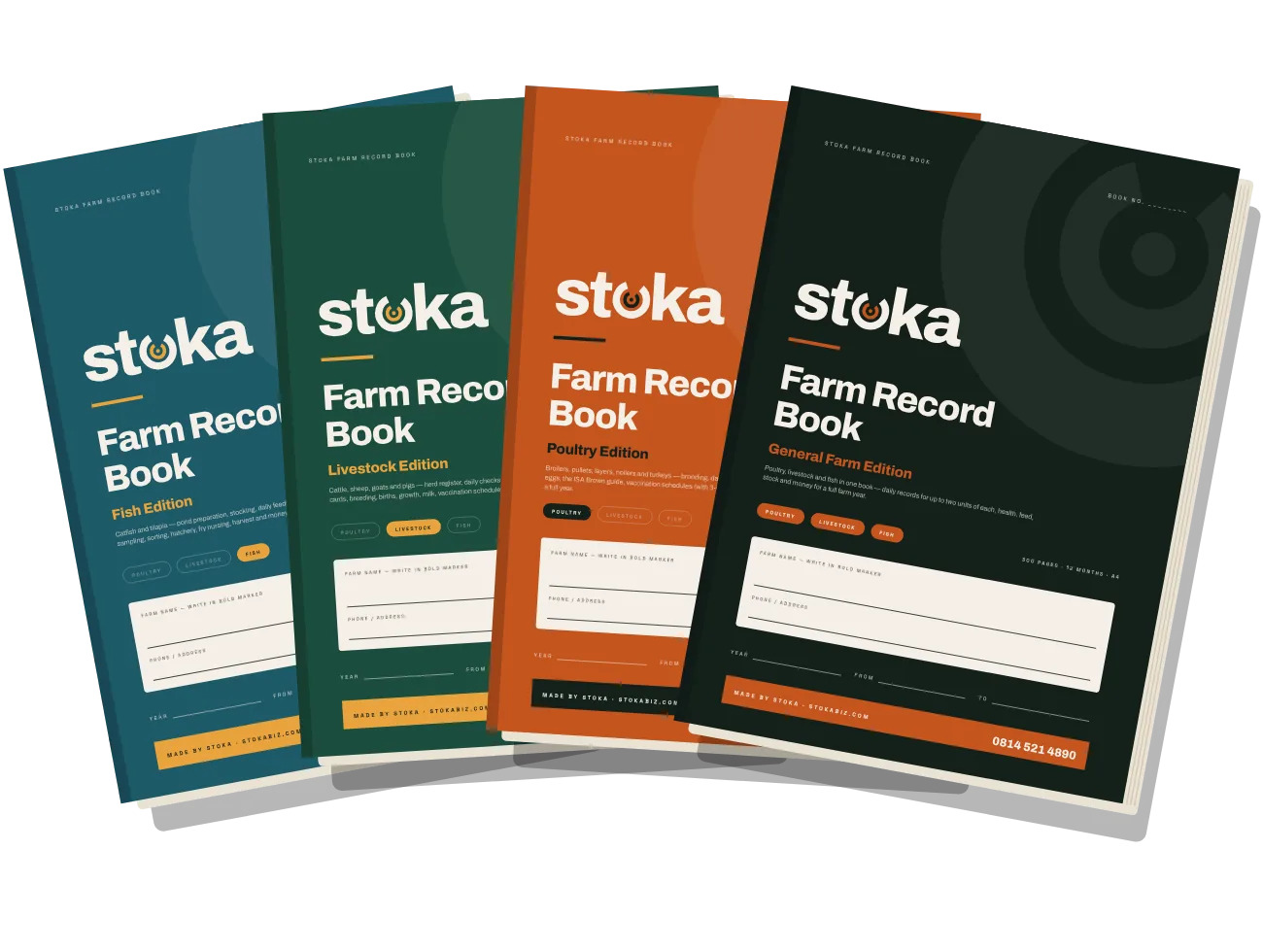
Paper records for poultry, livestock and fish farms: daily pages that take two minutes, vaccination and safe-to-sell dates, breed targets printed on the page, and money pages that show the year’s profit. Four editions, or a custom edition printed with your farm’s name.
Get Stoka
The general-purpose build for any retail shop and any stock. Free to install, and a license covers everything beyond selling.
Ask for a copyThe same engine in a farm and agro-produce edition. Ask us and we will send you the installer.
Ask for a copyPrefer not to install anything? Get your business its own Stoka account in the browser, with a 7-day free trial and nothing to download.
Set up an account| Topic | Browser · online | Windows · offline |
|---|---|---|
| Install | Nothing to install. It opens in the browser. | Installs on the shop's Windows computer. |
| Internet | Needed, so every device sees the same stock. | Not needed. It sells with no internet connection at all. |
| Receipts | A4, 80 mm or 58 mm roll from the browser. | Prints on the printer your computer uses. |
| Cost | 7-day free trial with every feature, and no card needed. | Free to install. A license covers everything beyond selling. |
| Your records | Kept in your online account. | Kept on the computer, with a dated copy saved to a folder you choose for 60 days. |
On the Stoka Windows edition, selling, including printing that sale's own receipt, always works. A license covers the rest: restocking, purchase orders, reports, multi-branch tools and more. The Windows edition checks your key on the computer itself, so it keeps working with no internet connection. Once you choose a folder, it saves a dated copy of your records there each time it starts, every 15 minutes and when it closes, and keeps the copies for 60 days.
Pricing
There's no generic price list, because no two shops run the same way: one till or five, retail or wholesale, online or the licensed Windows edition. Tell us your setup and we'll agree on a plan that fits.
Why Stoka
On the online edition, every connected device sees the same stock as soon as a sale is saved.
Built around the screens a shop uses every day, with a short quick guide for the rest.
Message us on WhatsApp or email and the person who built Stoka replies.
Resources
A short, plain-language walkthrough: adding products, changing prices, taking a sale. Ask for a copy and we'll send it over.
Stoka has had many releases since it was first built. The online edition updates for everyone as soon as a new version is published. On the Windows edition, install the newer installer over the old one and your records stay.
Version 1.6.15 of the Windows edition passed 524 automated screen checks before it was released, along with tests of its saving service, its update path and its installer. They cover sales, refunds, stock, purchases and receipts.
Questions
The online edition needs an internet connection, because that is how stock stays the same on every phone, tablet and computer. The Windows edition works with no internet connection at all and checks your license on the computer itself.
There is no generic price list, because no two shops run the same way. Every new online account starts with a 7-day free trial, with every feature included and no card needed. Tell us your setup, on WhatsApp or by email, and we will agree on a plan that fits.
Selling keeps working normally. Restocking, purchase orders, reports and other admin tools wait until you activate a license key. Message us before the trial ends and we will agree the plan with you.
Yes. The owner signs in on each phone or computer once. After that, each staff member uses only their own PIN. If a phone is lost or a staff member leaves, sign out every device from the Admin screen and sign in again only on the ones you trust.
For the password, the owner recovery key (shown once in Admin, under Security) lets you choose a new one from the sign-in page at any hour. For the Admin PIN, press Forgot PIN on the PIN screen and reset it with the owner email and password. If both are lost, message us on WhatsApp and we will help you get back in.
Yes. Each device picks A4, an 80 mm roll or a 58 mm roll. You can print through the browser print window, and on a computer with Chrome or Edge you can connect a receipt printer and print without the window. Printers differ, so print one test receipt on yours during the free trial. The Windows edition prints on the printer your computer uses.
Yes. The online edition opens in the browser on a phone, a tablet or a computer, so there is nothing to install. Sign in with the owner email and password and start selling.
Yes. Switch between locations, see stock and sales for each one, roll it all up to the whole business, and move stock from one branch to another with a record of what moved and when.
Yes. Every business has its own separate account, and a phone or computer must be signed in with the owner email and password before it can open your shop. You can also export your stock, your sales, what you owe and what you are owed as CSV files.
Stoka AI is the help panel inside the app. Ask in your own words and it shows the exact steps from a built-in guide that works with no internet. When you are online, your question can also be sent to an AI service to be written up in plain words. What goes out is the question, your last two questions and answers, the screen name, your language and a random installation code, never your stock, your customers or your staff names, and Stoka does not keep the questions. The Sales Analysis only works when the Admin switches it on and chooses, for each person, no access, their own sales only, or everyone’s sales.
Message us on WhatsApp at +234 814 521 4890 or email stokaappbiz@gmail.com, and the person who built Stoka replies.
Not on the list? Ask us directly.
Ask on WhatsAppTell us about your shop and we'll get you set up.
stokaappbiz@gmail.com